CONTENTS

🤓 The 2026 Local Search Ranking Factors are here!! Check out the report!

TL;DR:
• Google Posts are an underused but valuable Google Business Profile feature that can help local businesses stand out from competitors.
• Google is actively promoting Posts through workshops, playbooks, and new features, which suggests they are here to stay.
• As Google leans further into AI-based search experiences, Posts give businesses more control over the information shown on their Profiles.
• Posting consistently (ideally weekly) with strong CTAs, authentic visuals, and Offer/Event content can improve engagement and conversions.
• Businesses should treat Google Posts as a local conversion tool and use UTM tracking and experimentation to learn which content drives the best results.
Think the Google Business Profile Posts feature might be taken away, meaning it might not be worth your local business’ investment of time? Today is a chance to think again, because at Whitespark, we’re seeing Google doubling down on this extremely useful feature that so many local brands simply ignore.
If you:
this guide is for you!
Bookmark this guide and share it with your teammates, staff, or clients to build up excitement and buy-in around this overlooked feature that could be bringing so much more business your way.
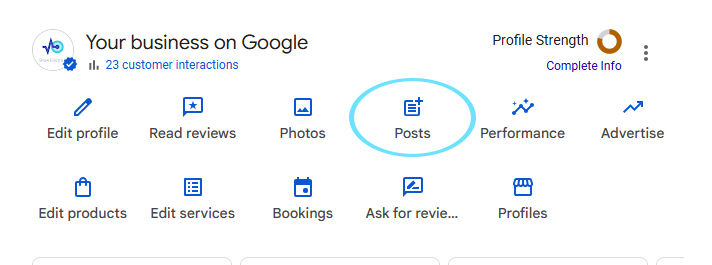
Google Posts is a feature that lets you add fresh content to your Google Business Profile on a regular basis. To access them, look up “my business” in Google to see your New Merchant Experience dashboard and then click the heading labeled “Posts”:
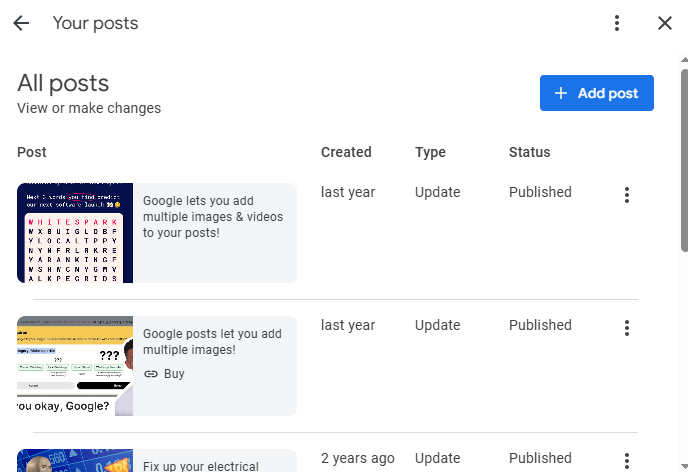
Clicking the heading takes you to a popup overview of your Posts. Click the “Add post” button to write a new one:
The Google Posts dashboard looks like this:
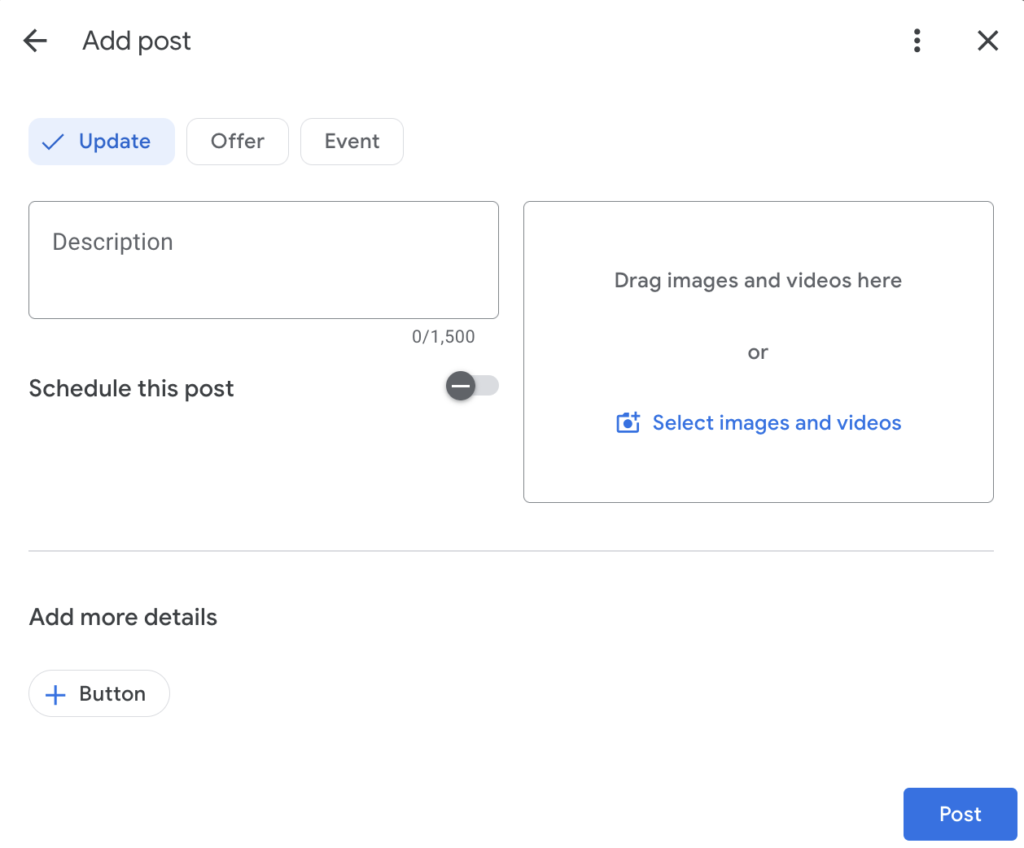
Use it to choose whether you want to create a simple Update Post, an offer, or an event, write a description, add photos or videos, schedule publication, and add more details like a clickable button, coupon, links to redeem an offer, or information about terms and conditions.
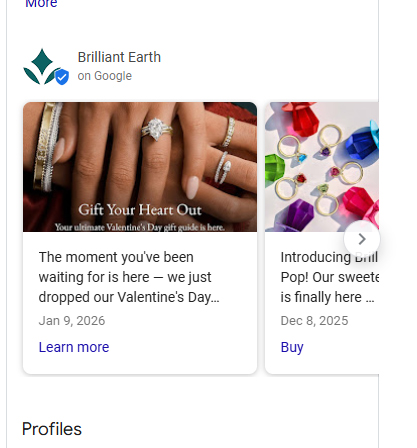
Once you publish, your live Google Post will look like this on your Google Business Profile (GBP) or Google Maps listing:
And potential customers can click on your Posts to see them in a popup like this for full information:
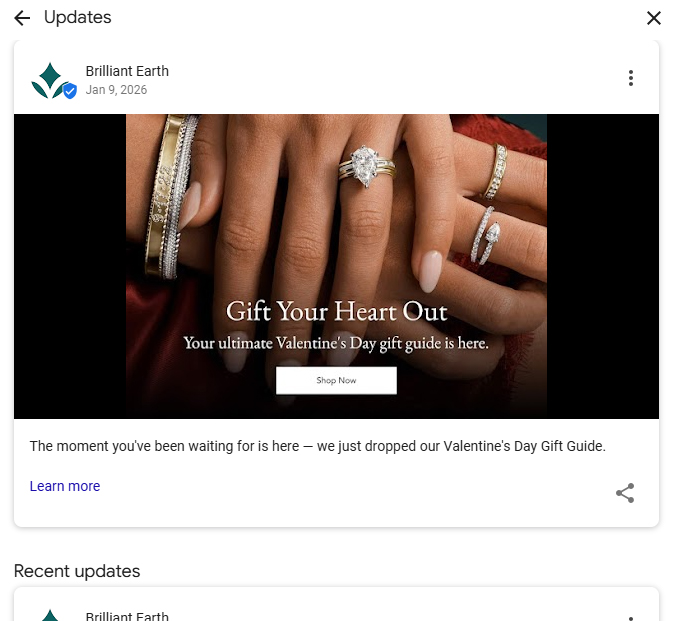
In brief, Google Posts are sometimes referred to as a “microblog” for your local business listing, meaning that you can use them to enrich the content you are publishing on your GBP at any time to earn more attention, engagement, and actions from potential customers. The whole point is to use this feature to get chosen by the public over your nearby competitors – an opportunity worth embracing!
Check out the massive call-to-action Google is now placing on GBPs in an effort to prompt local businesses to make use of this feature:
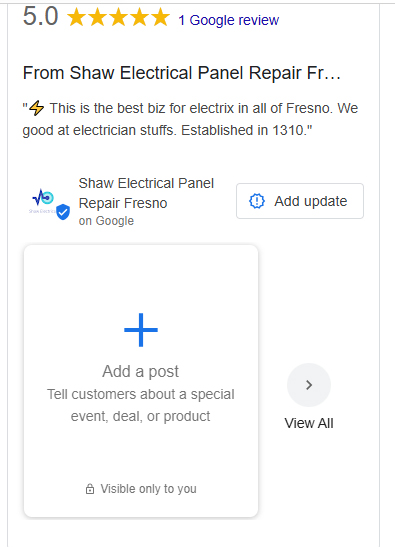
But it’s not just the big CTA that’s adding to our confidence that Google Posts are here to stay.
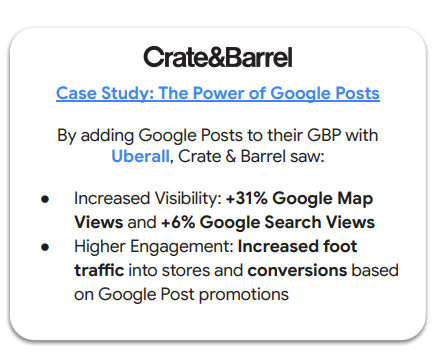
Google’s Lisa Landsman and Matt Gnagy recently hosted a Google Posts 101 Workshop webinar dedicated to promoting usage of this feature. Meanwhile, all 5 of the new Google Business Profile Playbooks urge local business owners across all applicable industries to see Google Posts as foundational to optimizing GBPs, going so far as to highlight a case study of the results Crate & Barrel saw from posting:
Further, Matt Gnagy made a point in the Google workshop of showing how Posts display in multiple places for local consumers, including in the image carousel of the Google Maps Mobile App:
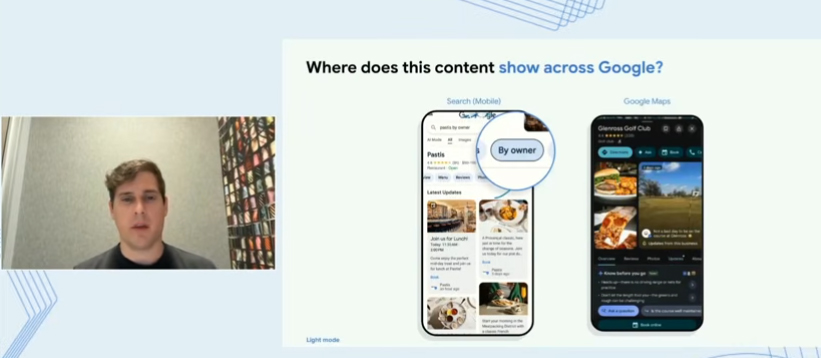
And, to sweeten the pitch, Matt mentioned that Google is seeing exciting Event posts creating a 9% lift in user engagement. He calls this “very high value visual real estate”.
We sympathize if the recent loss of a feature like Google Questions and Answers has you worried that Google Posts will also be taken away without so much as a by-your-leave, but we feel confident that this element has a future.
Not only is Google investing in promoting it, but their decision to tie themselves to AI has made the search engine more dependent than ever on scrapable content. Should Google decide to scrape Google Posts to return information in Google AI Mode or the Maps app “Ask a Question” feature, they could get an abundance of content from active local business owners.
💡 Pro tip: Google’s AI-driven features in their mobile Maps app are really ramping up. They offer exciting possibilities for consumers, but can also be a source of anxiety for local business owners who feel they are losing control of customer experiences. A big bonus of Google Posts is that they offer direct control of the content that appears on your listing. This is increasingly valuable when so many other Google-based consumer experiences are now being driven by AI scraping content from sources you don’t own.
Want a super-easy local SEO win? They’re hard to come by these days! Take a look at the Google Business Profiles of your nearby competitors. Do you see messaging in their Posts section that reads, “View previous updates on Google”, like this:
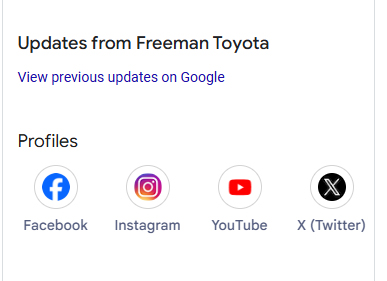
This appears when Google doesn’t have a Post that is recent enough to be displayed in the Posts carousel, and it’s a big flashing sign to you that a competitor is sleeping on this feature.
The truth is, it’s easier to find brands who are ignoring Google Posts than those who are making consistent use of this content marketing opportunity. We can almost guarantee that there are competitors in your town or city whom you can outpace, simply by committing to a Google Posts publishing schedule. What an easy way to stand out from the crowd!
Whether this is the first time you’ve tried Google Posts or you’re giving them a second chance to drive results for your business, we recommend experimenting with all of the following that apply to your business model:
Lisa Landsman says you can think of posting consistency as a “signal” to Google that you are active on GBP. This suggests that, like review velocity, posting velocity could impact the visibility of your GBP.
Lisa says this will yield the highest public engagement with your content.
Google will truncate your Posts text after 80-100 characters so put your best pitch at the beginning of your messaging. In other words, don’t begin with “Hi, everybody! Our team hopes you’re feeling hungry for a great sandwich today.” Instead, start with “50% Off French Dip Sandwiches Today.” Landsman recommends using the first 10 words to engage your audience.
Google prefers proprietary images of your staff, premises, goods, etc. over generic stock photography or other image content that doesn’t actually represent your real-world business. Take good, clear photos and upload high-resolution image files with a recommended spec of 720×720 px.
Landsman says, “People want a vibe check, not a documentary”, and she emphasizes that, when it comes to images and videos, the goal is to be “present, clear, and real”. In other words, don’t feel you can’t start using Google Posts until you have professional visual media to share; consistency and authenticity resonate with the public.
Landsman offers this summary:
Lisa Landsman offered this very good Google Posts tip on Linkedin for restaurants:
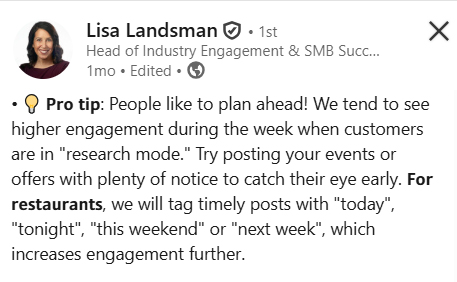
Landsman suggests that the following tips improve conversions:
Landsman specifically calls out these tactics that Google considers spammy:
“Google’s automated filters are much stricter than other platforms,” she says, meaning you’ll be wasting your investment of time in Google Posts if what you write doesn’t get published because you’re going against best practices.
Whitespark has been warning about this misconception for a long time, as Darren Shaw explains here:
Our team feels especially vindicated that we’ve been offering good advice in hearing Lisa Landsman explain that, while social media users are looking to be entertained (endlessly scrolling for funny cat videos), people engaging with your GBPs are on the verge of a transaction. They want to know what your special offer is for dinner tonight – not that your team went on a work retreat at an amusement park. Be actionable rather than entertaining with your Posts content to meet local search intent.
The Google workshop repeatedly emphasized making the commitment to posting at least once a week. We know that things can get busy and cause you to fall back into an irregular posting schedule, but here are are few features that can help you achieve consistency:
Maybe you only have 20 minutes on one weekend per month to sit down and write posts, so go ahead and do the work then, but use the “schedule this post” feature to have your posts go live on specific weekdays across the month during your open business hours.
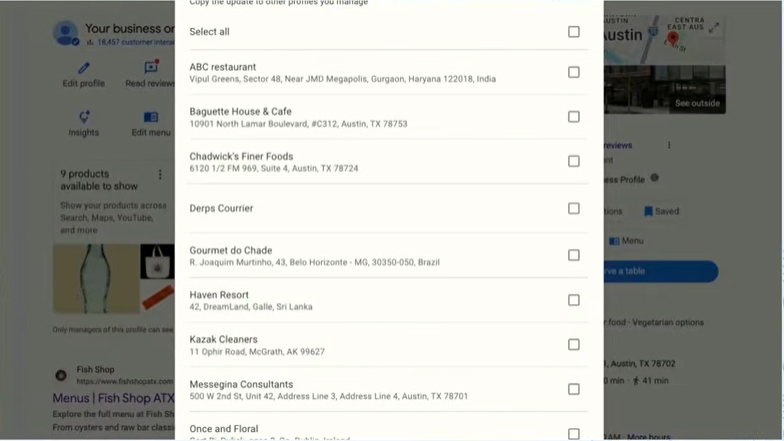
Use the “copy the update” feature to post the same post across multiple locations of your business. This will save you the time of having to write a unique post for each branch.
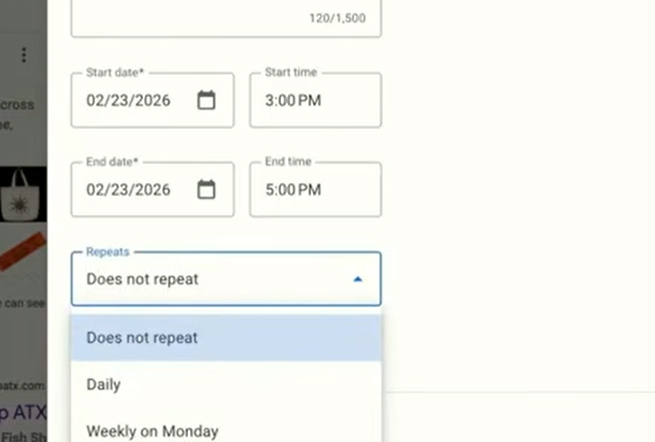
Have an offer or event, like a happy hour, that repeats on a regular schedule? Google’s newest Post feature lets you schedule repeat publication of a single post. A big time saver! Here’s Darren Shaw debuting this new function:
The Google workshop offers basic best practices, and calls out bad practices that will cause your Posts to get rejected. Consider this education table stakes, and get good at the simple stuff of consistently publishing actionable Posts. But don’t mistake general advice for institutional knowledge about your specific business, industry, and the communities you serve. Feel free to challenge assumptions and see which forms of media drive maximum engagement and conversions for the brands you’re marketing.
For example, Google recommends keeping your Posts videos to 30 seconds, but, in this short, Darren Shaw shows how local SEOs are questioning whether longer videos might also have a legitimate place in your GBP content marketing plans:
Another thing to stay curious about is whether the voice of your brand or your customers is more influential in Google Posts content. Specifically when it comes to Updates Posts, Whitespark recommends experimenting with re-purposing reviews as Google Posts. A recent survey by GatherUp of 1000 US-based consumers finds that 55% of the public trusts what customers say about a business more than what a business says about itself. Try featuring both review screenshot and video-based reviews of customers’ own words.
Do feel free to experiment with scheduling. As we’ve seen, Google reps recommend publishing Posts during open business hours, but what if all of your competitors adhere to this? It could be worth it to test publishing Events Posts on the weekend to help them stand out for any potential customer who is thinking about what they’d like to do in the week ahead.
SEOs have also experimented with the use of emojis in Google posts as attention-grabbers. In fact, Sterling Sky ran a 2023 study that found that posts with these colorful symbols got 2x the clicks as those without them. You could give these a try.
This same study found that Posts that contained images with text in them got 4x the clicks of those with textless images. Your image content could be the most experimental aspect of your Google posts, enabling you to feature not only reviews, but all kinds of exciting CTAs.
You have a good degree of creative freedom when it comes to Google Posts. Use it!
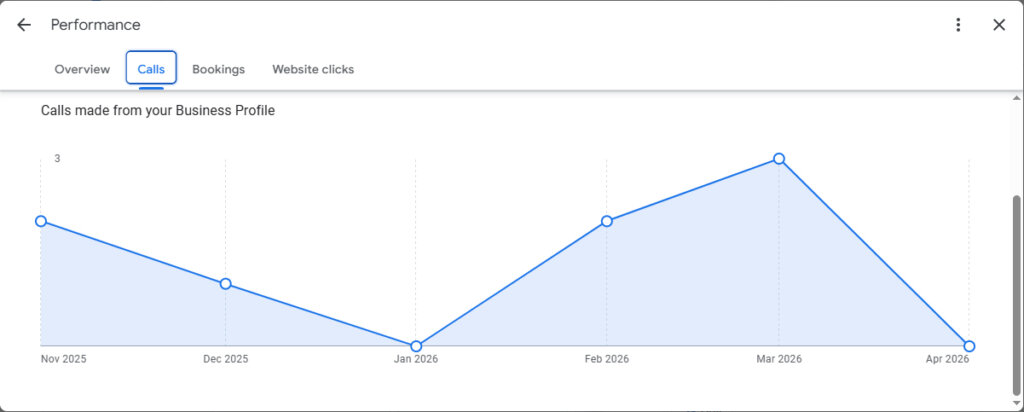
The “Performance” tab of your New Merchant Experience dashboard reports on both calls and website clicks on your GBPs, and it’s important to know that when these activities occur on your Google Posts, they are folded into these views rather than reported separately.
Thus, if this is the week you commit to a new weekly Google Posts publishing schedule, you can get a quick sense that your strategy is resulting in increased calls and website clicks over the coming weeks and months simply by checking your Performance tab. Upward movement in these metrics is a good sign, but rather unspecific. After all, increases could be coming from something else you’re doing, like earning more reviews or adding new photos.
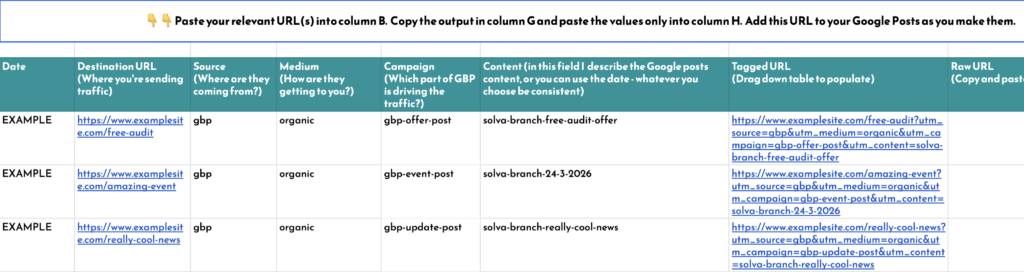
You can get more granular business intelligence by adding UTM parameters to the URLs you are using in your Google Posts. Our own Claire Carlile has published a spreadsheet template for adding UTMs to your Google Posts’ URLs so that you can track which specific types of Posts are driving the most traffic and greatest number of conversions for your unique business in Google Analytics and Google Search Console.
Over time, studying the outcomes of different types of Updates, Offers, and Events will help you learn which kinds of posts drive the most local engagement for your business.
As we’ve seen, Google’s history of debuting and sunsetting local search features has contributed to a lack of public confidence over whether investing too much time in any one GBP element is a good marketing decision. In the case of Google Posts, Whitespark believes that the effort the company is currently making to educate business owners about this feature is a good sign that it will have a long shelf life.
In the course of creating this guide to Google Posts, one thing we investigated was whether this content is currently showing up in Google’s emergent suite of AI-driven features, such as AI Overviews, Google AI Mode, and Ask a Question. We do not currently find evidence of this, but can imagine a future in which Google could scrape Posts’ content to further feed their LLMs.
Perhaps the most important question is whether Google’s outreach efforts surrounding Posts will actually result in increased adoption of this marketing opportunity by local businesses. The earlier-cited experiment with Google Q&A saw lackluster adoption by local brands, and led to this GBP element being a source of unhelpful remarks from the public coupled with neglect by business owners. The greater buy-in Google can earn from local businesses, the more stable a future Google Posts should have.
But don’t wait for your competitors to take notice of this extremely useful and creating content marketing freebie. Set yourself apart from less-engaged nearby brands by committing to a minimum weekly posting schedule to stand out with engaging content in the communities you serve.
Feel you’ve mastered Google Posts? Social media is a different animal, as emphasized by Google’s own reps. Make your next steps smart ones by reading Whitespark’s Ultimate Guide to Social Media for Local Businesses.
Miriam Ellis is a local SEO columnist and consultant. She has been cited as one of the top five most prolific women writers in the SEO industry. Miriam is also an award-winning fine artist and her work can be seen at MiriamEllis.com.


Whitespark provides powerful software and expert services to help businesses and agencies drive more leads through local search.
Founded in 2005 in Edmonton, Alberta, Canada, we initially offered web design and SEO services to local businesses. While we still work closely with many clients locally, we have successfully grown over the past 20 years to support over 100,000 enterprises, agencies, and small businesses globally with our cutting-edge software and services.