CONTENTS

🤓 The 2026 Local Search Ranking Factors are here!! Check out the report!

A service area landing page is a unique website page featuring information about a specific location within a local business’ service radius. While location landing pages feature the physical storefronts of a brand, service area landing pages focus on letting customers know the business can come to their locations.
Classic examples of service area businesses (SABs) include plumbers, cleaners, contractors, and other home services companies. Mobile business models like mobile car repair brands or mobile notary publics are also good candidates for the publication of service area landing pages. These pages can also be useful for hybrid models, like restaurants that offer both in-house dining and home delivery.
Need to increase your presence in Google’s organic results when local searchers are looking for goods and services that can be brought to their doors? Service area landing pages are the answer! When well crafted, service area pages:
This is the only guide you’ll need to create and publish the perfect set of service area landing pages to represent key communities in your service radius. This guide addresses the historic challenges SABs face online, provides a keyed template mockup for the development of strong service area pages, and gives expert advice on developing strong and helpful content for the customers you want to serve. We’ll close with an FAQ section that will answer questions that are sure to come up while you’re building out this area of your website.
Effective service area landing pages are customer-centric. They directly address website visitors, answer their top questions, and highly feature the benefits the customer will experience by choosing your brand. They should be models of Google’s Helpful Content Guidelines by presenting “helpful, reliable information that’s primarily created to benefit people, not to gain search engine rankings.”
Because you’ll be creating these pages for the customers you want to serve, your initial tasks are to discover: 1) what local people need, and 2) what words they use to find what they need online. You have at least 7 options for accessing this vital business intelligence:
1. Surveys and polls that ask nearby consumers to specify what goods and services they need and are finding hard to access.
2. Studying your competitors’ websites to see what goods and services they provide and exactly how they are wording those offerings.
3. Studying online search language with software, like Answer the Public and AlsoAsked.com or one of the many keyword research tools out there from brands like Semrush or Moz.
4. Google intelligence right in the SERPs like “people also ask” boxes. You can also start typing one of your important search phrases into a Google search box and take note of what comes up in the autocomplete dropdown that appears. These features reflect how people are searching Google for the things you offer.
5. Staff intelligence based on training your team to record the terms customers use when they contact the business.
6. Social intelligence based on the conversations you see coming up on platforms like Reddit or Instagram when brands, products, and services like yours are being discussed. Pay attention to how the public talks about offerings like yours.
7. Artificial intelligence based on prompting programs like ChatGPT or Google AI Mode to generate lists of search phrases and questions people might use when seeking the goods and services you offer. Do bear in mind that AI is prone to making mistakes, so take this information with a grain of salt rather than as fact written in stone.
Document the findings of your research so that you can approach the development of your service area landing pages equipped with data-based facts about what nearby communities want and how they speak and search.
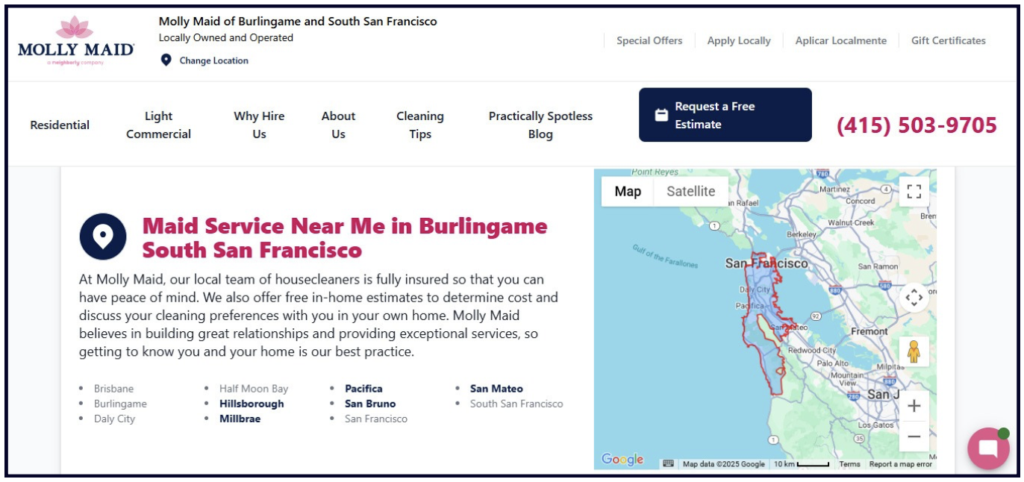
You’ll also be able to look at a competitor’s service area page, like this example from a well-known cleaning service, to evaluate what they’re getting right and wrong, based on your own research, and how you can create an even stronger page:
But before you start writing, we’ve got a bit of a mountain to climb.
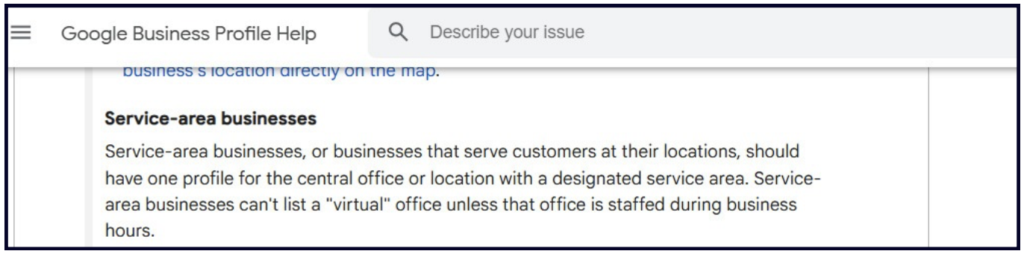
Service area businesses are an essential part of local commerce, but you’re not wrong if you feel like Google has always treated these models as something of an afterthought, coming in second place to brick-and-mortar brands.
The Guidelines for representing your business on Google outline the search engine’s outlook and position on SABs and how they want them to be listed in the Google Business Profile system. Sometimes, Google’s takes on things don’t seem to reflect real-world realities, but you need to understand their rules to play safely in their ballpark, without fear of having your listings suspended or removed. Google offers this unique page of guidelines for SABs.
While you’re, of course, at liberty to do anything you like on your own website, here’s what you need to know about the Google Business Profile (GBP) guidelines for SABs:
While the address you provide Google with can be the business owner’s home address, don’t create additional GBPs for the houses of your employees
Your business title on your listing should consist solely of your real-world business name, without any additional modifiers like the names of cities you service.
You can have just one Google Business Profile for your central office/base of operations within a designated service area.
Whether this office is the business owner’s home or something like a facility from which staff drive company vehicles to customers’ locations, you must provide its address to Google while creating your GBP, but then hide the address, because Google does not want SAB addresses visible in their system.
If you’re marketing a hybrid business like a staffed auto repair shop that also offers roadside service, you can show your address on your listing while also designating a service area.
You can have up to 20 service areas for each listing.
Don’t create separate listings for the different services you offer. For example, your HVAC company should have just one listing, not three listings to represent your heating, ventilation, and air conditioning services.
If you are marketing an SAB chain or franchise with more than one base of operations and separate staff at each of these, you can create a GBP for each of these entities.
The boundaries of your service area typically shouldn’t extend farther than about two hours’ driving time from the base of operations. However, Google states, “for some businesses, larger service areas may be appropriate.”
Typically, service areas should not overlap, but Google makes apparent exceptions to this for franchises that have different legal business entities with separate staff. For example, a large plumbing franchise might have more than one branch within the two hour driving time limit and be allowed to create a separate GBP for each.
SAB owners frequently arrive in local SEO forums reporting that their local rankings dropped in Google’s system as soon as they complied with the requirement of hiding the address on their GBP. It feels like being punished for playing by the rules.
Part of this frustration is often rooted in the fact that the compliant business is being outranked in Google’s local packs and Maps by competitors who are violating the guidelines and have visible addresses. The reality of this dilemma of losing rankings after hiding a business address has been captured in studies like this one from Sterling Sky, but the exact cause of this documented effect is speculative.
💡 Darren Shaw has put forward two very good theories:
1. That if your business originally registers at an address when first creating your Google Business Profile and you subsequently move to a new location and hide your address, your rankings may actually be reverting to our original address.
2. That there may also be an unaddressed Google bug at work in cases in which there has been no change of location/address.
The problem is serious enough that service area businesses may need to consider getting staffed physical addresses to compete on a level playing field with brick-and-mortar brands. You’ll frequently see this advice being suggested in the local SEO industry, but it isn’t always practicable, particularly for small SABs.
At best, Google Business Profiles can offer an overview of your business’ service area, but they can’t represent your customers’ locations with the same detail enjoyed by brick-and-mortar businesses who get to have a unique listing for each storefront.
Service area landing pages fill up some of this gap by giving you the space to address customers in each of your service locations with the helpful content they deserve. What your GBPs lack, your website can provide. And, while it’s frustrating when you’re not getting maximum visibility across all your service locations in Google’s local packs and Maps, you can set a goal of earning a high degree of visibility in Google’s organic results with your service area landing pages.
Typically, you should structure your efforts like this:

While service area landing pages can’t change Google’s SAB policies or make up for any lack of local pack visibility you’re experiencing as a result of their system’s behaviors, they can bring you lots of valuable leads from the organic results (as seen above). Let’s get writing!
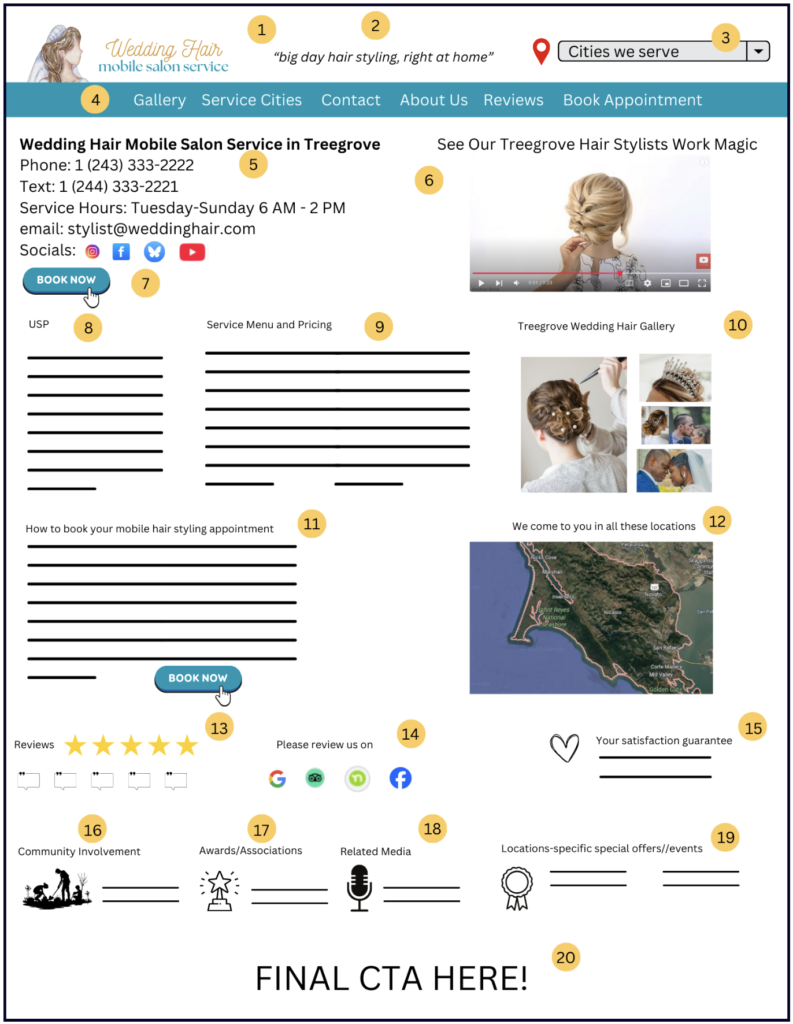
1. Logo – Your website logo should match your real-world advertising for maximum brand recognition. Be consistent with what’s on your company vehicles, uniforms, local print/TV ads, and social channels.
2. Slogan – Sum up the key benefit enjoyed by your customers when they choose you. Our example slogan emphasizes convenience.
3. Service area finder – Your masthead should emphasize the key locations your staff can come to customers to provide services.
4. Navigation – Put your site’s most important pages in a menu that is consistent across all pages of the website.
5. Comprehensive contact information – Put your complete business name + the name of the city you’re focusing this page on here, and follow it with every possible way a customer could reach out to you. This can include phone, text, email, and social media links.
6. Orientation video – Increase user engagement with the service area landing page by embedding a video that showcases the key services and benefits provided in the specific city. Our example shows a video highlighting the mobile salon services the business has provided in Treegrove. Your video could show projects completed within the city, staff at work there, service vehicles arriving at customers’ locations, etc.
7. Booking button – Be sure your main calls-to-action appear high on the page and throughout the page. Whether that’s booking an appointment, requesting a demo, requesting a quote, placing an order, or filling out a form, emphasize and facilitate the action customers need to take to engage with your business once they’ve landed on the page.
8. Unique sales/value proposition (USP/UVP) – Expand on your short slogan with a compelling explanation of the unique benefits the customer will enjoy by choosing the business. Use this section to address and solve your customers key pain points and questions, while emphasizing that these solutions occur in their city.
9. Service menu and pricing – List out your complete services here, and, if appropriate, increase qualified leads by including clear pricing information so that you’re not getting contacted by people who can’t afford your services.
10. Gallery – Because service area businesses so often have projects they can showcase, an image gallery is often the best way to help customers see what you can do for them. Feature before-and-after work, staff on the job, company vehicles and uniforms for trust, and other inspirational content related to the city being served.
11. How it works section – Explain how your service works, how to transact with the business, and what the customer can expect if they hire you. You could also use this section to highlight your authority, expertise, licensing information, and other trust-based content.
12. Map – Though each page will focus on a specific city, embedding a map of your complete service radius has two benefits. First, it helps customers visually confirm that you can come to their location. Second, it lets customers who have landed on the wrong page from the search engine results see whether their actual location is within your radius. It can also help them know that they can recommend your business to friends and family in other nearby locales.
13. Reviews – There is no more influential form of content you can include on a service area landing page than reviews from customers in that city. This section can include reviews you’ve earned on third-party review platforms like Google Business Profile, Yelp, or Facebook. It can also feature first-party reviews and testimonials you’re collecting directly from customers. You can show ratings, text, video-based customer testimonials, and even photos of hand-written testimonials.
14. Review requests – Use icons of your most important reviews sites to make it easy for customers to leave you a review on their preferred platforms. You can also put a link here for customers to leave you first-party feedback. Never offer any kind of incentives in exchange for reviews, as this is a violation of both review platform guidelines and legal codes.
15. Satisfaction guarantee – Earn customer trust and differentiate your brand by offering the best satisfaction guarantee in town. Consumer-centric brands have the built-in advantage of earning a positive reputation that influences rankings, revenue, and referrals.
16. Community involvement – Tie your work to the city you’re serving by detailing the ways in which your business is contributing to the community, such as:
This section gives you an opportunity to show how you’re connected to a specific city and why customers can feel extra good about choosing your business.
17. Awards/associations – Distinguish your brand by highlighting any city-specific awards you’ve won or associations you participate in. For example, a lifestyle magazine in a specific community might give you an award, or you could attend meetings of the city’s local business association.
18. Related media – If your marketing strategy includes appearing as a guest on local blogs, podcasts, online news, or video channels, this is where you can show off and link to your coverage.
19. Location-specific special offers/events – Highlight your sales, deals, coupons, discount codes, and other special offers available in the specific city.
20. Final call-to-action (CTA) – Always finish your landing pages with a final CTA. Emphasize the step you most want customers to take, be that booking an appointment, calling you, or requesting a quote via a form submission.
You’ll be publishing very strong service area landing pages if they check off all of the above elements, but there’s more you can do to go the extra mile. If you’re in a competitive market and need to stand out, keep reading!
Pick and choose which of these features could boost the helpfulness of your page:
1. Purchasing functionality
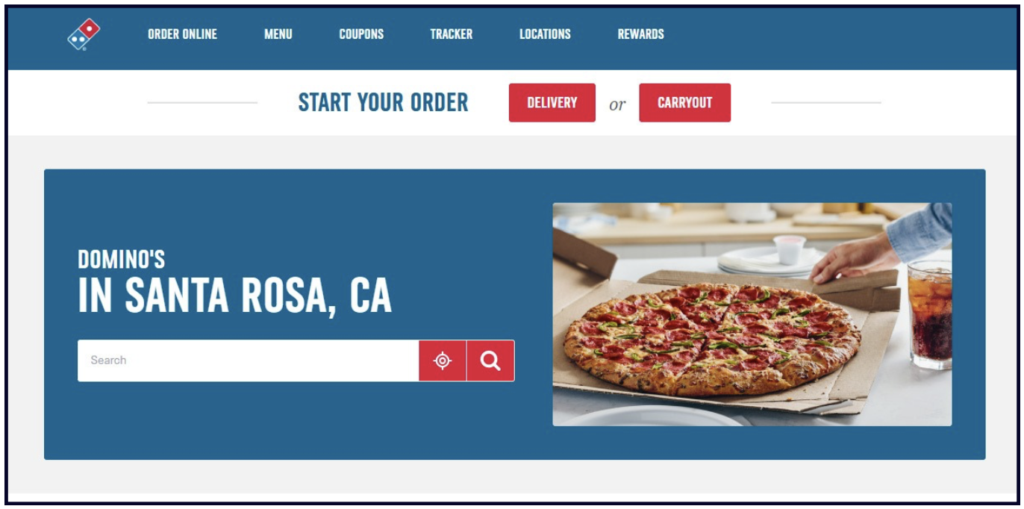
If your SAB delivers goods (like a pizza restaurant), be sure ordering functionality is available on each location landing page. The above example from Domino’s Pizza shows how easy they make it for customers to start their order for delivery or takeout.
2. Q&A section

While your website may have a stand-alone FAQ page, you can make full use of the research you conducted by listing out and answering all of your customers’ commonest questions in a dedicated Q&A section on each service area landing page. This provides maximum opportunity to optimize the page’s content for tons of relevant phrases while providing welcome help to visitors.
3. Loyalty/word-of-mouth programs
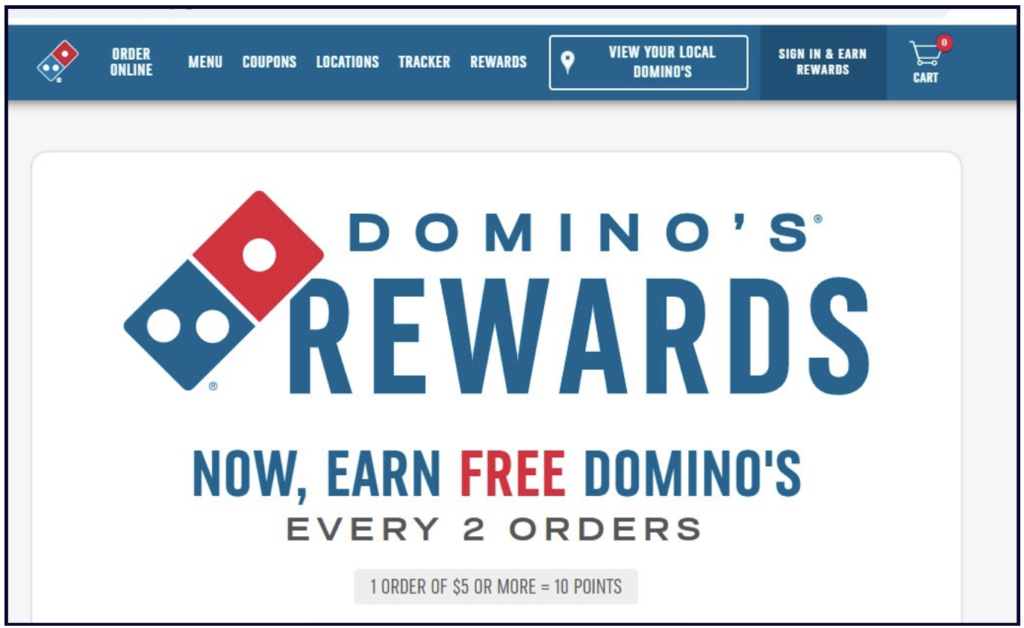
Incentivize repeat business and referrals with loyalty and rewards programs.
4. Customer contact data collection – Build up your audience base by collecting the email address/text lines of your customers on your service area landing pages. Offer a newsletter, coupons, discount codes, or other benefits in exchange for this information.
5. Live chat – Offer instant virtual assistance with a live chat widget. Ideally this should be staffed by humans for a superior customer experience, but automated chat bots and AI-trained environments can also provide an additional layer of support.
6. Apps, tools, and widgets – Use your service area landing pages to earn app signups, if applicable. Your business may have a variety of tools and widgets (like mortgage calculators, project estimators, virtual reality generators, etc.) that can be featured on these pages.
7. Career information – Showcase your position in a specific city as a local employer. List your job openings.
8. Networking information – Share leads with your local peers by developing a city-based referral network. Our mobile wedding hair stylist could build up business for nearby apparel rental shops, caterers, florists, event centers, houses of worship, and DJs while enjoying the benefits of their referrals. Be sure to vet anyone you vouch for as you want to be certain your valued customers will have a good experience with any other business you recommend.
Let’s answer your FAQs and build your confidence that you’re developing this important website content the right way.
Q: How do I do service area landing page SEO?
A: Reflect the city name + the most important search phrases you’ve discovered in the following page elements:
Q: Do I need to worry about duplicate content on my service area landing page?
A: Duplicate content penalties are extremely rare and Google only applies them if your website is scraping and plagiarizing the content of other publishers. Don’t be concerned if areas (like service menus and pricing) are the same across multiple pages. However, do look for ways to differentiate page content via elements like reviews, expert advice, imagery, and other features, so that each community is enjoying a helpful experience that’s been customized for them. Avoid publishing large volumes of pages with thin, unhelpful content.
Q: Should I build unique pages for every service+city combination?
A: For most small businesses, this approach would be overkill. A more practical approach is to have A) a set of service area landing pages and B) a set of service description pages and then link robustly between the two. This way, visitors wanting to know more about something like your mobile hair coloring service can access that page from your service area page for their city and vice versa.
Q: Should I build more granular service area pages?
A: If you’re serving in a metropolitan area with distinct communities like neighborhoods or boroughs, yes, you may want to develop landing pages for those areas to be considered a relevant match for people searching for terms like “mobile wedding hair service bronx” or “fence builder mission district”.
Q: How should I handle the contact section of my landing page for a hybrid business model?
A: If, like a pizza restaurant, you have both dining and delivery options, you can create location landing pages for the cities in which you have physical premises + service area landing pages for cities where you deliver but don’t have a storefront. Link between the two types of pages.
Q: Are service area pages a set-and-forget task?
A: Not usually. At minimum, audit these pages from time to time to ensure they reflect any changes you’ve made in your operations, such as new service hours or new services. If you’re in competitive markets, creating a strategy to keep page content fresh can help you stand out. Your reviews section is a natural fit for this, but you can also consider rotating sales, an expert tips section, and new links to new additional PR.
Service area landing pages are just one part of your website that can drive leads to your business. Want to maximize the calls, texts, and bookings you’re receiving? Read The Whitespark Guide to the Perfect Small Local Business Website.
Miriam Ellis is a local SEO columnist and consultant. She has been cited as one of the top five most prolific women writers in the SEO industry. Miriam is also an award-winning fine artist and her work can be seen at MiriamEllis.com.
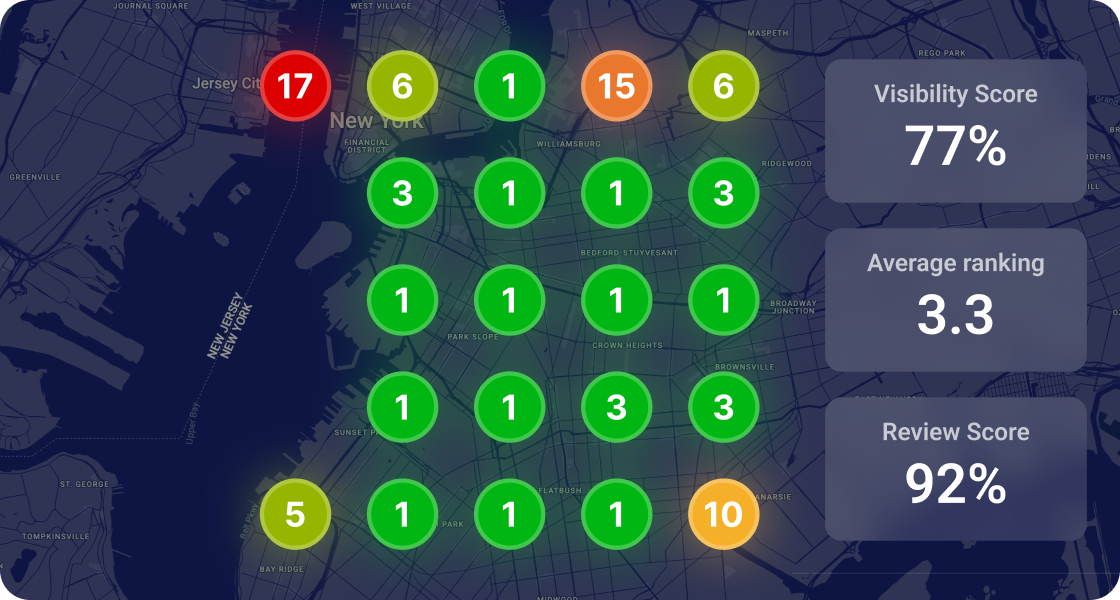


Whitespark provides powerful software and expert services to help businesses and agencies drive more leads through local search.
Founded in 2005 in Edmonton, Alberta, Canada, we initially offered web design and SEO services to local businesses. While we still work closely with many clients locally, we have successfully grown over the past 20 years to support over 100,000 enterprises, agencies, and small businesses globally with our cutting-edge software and services.